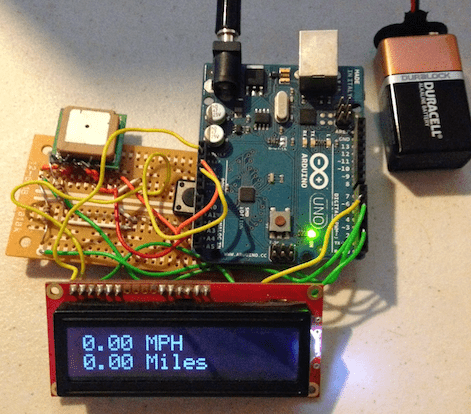
You can do a lot of cool things with GPS data, and it's easier than ever to build projects with GPS modules. Many of these are available at SparkFun at relatively low prices and can be programmed to do all kinds of things. Below is a very basic schematic connecting one of these modules, The UP501, to an Arduino microcontroller. The UP501 has been discontinued, but there are many similar models available. Check out SparkFun's cool GPS Buying Guide.
This is a brief outline of how to extract data from these modules using a microcontroller, in this case, an Arduino Uno.
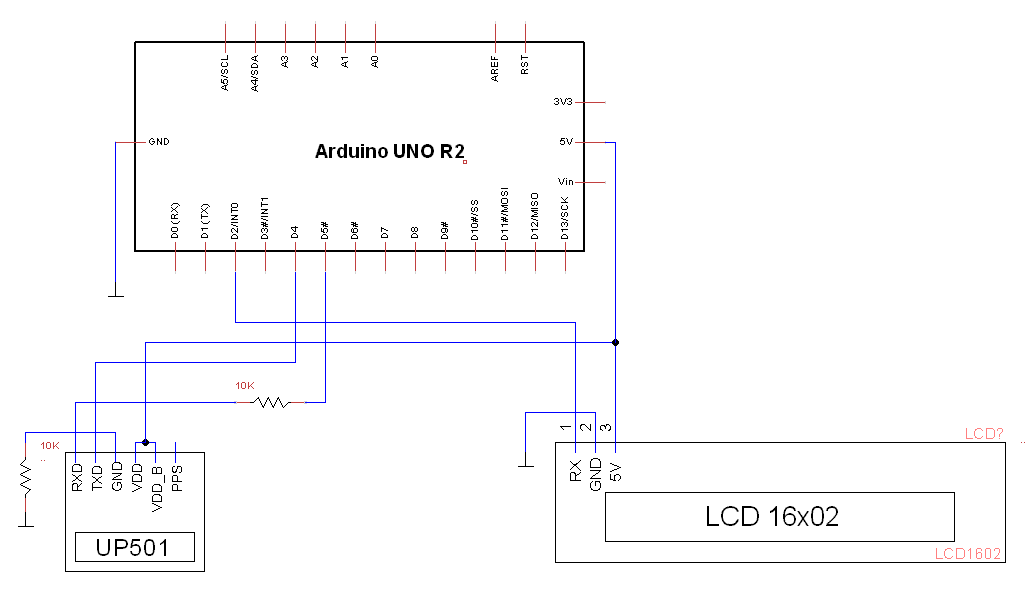
Basically, we want to feed serial data in the UP501 via its RX port and receive it's output via the TX port. The Arduino will be receiving this data via its own serial port and we can manipulate it with our code.
The module outputs data in NMEA format. NMEA data consists of strings of sentences, the first word of which defines the values of the rest of the string. Here is an example of a single sentence of NMEA data:
$GPRMC,092751.000,A,03424.698,N,11951.976,W,0.06,31.66,280511,003.1,,,A*45
These values map to the corresponding values:
| Syntax | Description |
|---|---|
| GPRMC | Title |
| 092751 | Text |
| A | Status = Active (Alt V = Void) |
| 03424.698,N | Latitude 34 degrees 24.698 minutes North |
| 11951.976,W | Longitude 119 degrees 51.976 Minutes West |
| 0.06 | Ground speed in knots |
| 084.4 | Track angle in degrees |
| 280518 | Date 28th of May 2018 |
| 003.1 | Magnetic variation |
| A*45 | Checksum Value |
As you can see, there is quite a lot of information for you to play with.
In this case, I'm just going to show you how I used this data to make a simple speedometer using the module's speed output. All this requires is for us to parse through this string to collect the entry after the seventh entry. Pretty simple!
/*parses through NMEA string using commas as delimiters */

void dataParse(int section) {
  char nextChar;
  int commas = 0;
  for (int x = 0; x < dataStr.length(); x++) {
    nextChar = dataStr.charAt(x);
    if (nextChar == ',') {                /*If comma is found, */
      commas++;                           /* increment comma counter and continue*/
      continue;
    }
    if (commas == section) {              /*"section" refers will be equal to 7 */
      returnStr.concat(nextChar);         /* because speed data is after 7th comma */
    }
    else if (commas > section) {          /*After we have passed the speed data,*/
      break;                              /* we start over on the next string*/
    }
  }
}
The UP501 outputs these NMEA strings by default at 1Hz. You can send instructions through the serial connection to increase this frequency to 5Hz or 10Hz. Each time we get an updated value, we send that string to a 16x2 LCD screen and we're done!